
Changing the list view
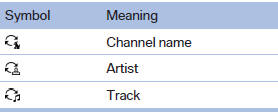
The list view changes every time the first symbol on the navigation bar is pressed.
Information on the channel is displayed.
See also:
Service Request
At a glance
Sends information to your service partner to request
the arrangement of a service appointment.
The TeleService data is transmitted during
a Service Request. If possible, your service ...
Malfunctions
Steering wheel vibration
Frequent activation of the steering wheel vibration
causes the system to overheat.
This causes the lane departure warning to become
deactivated.
Let the system cool and ...
Route criteria
General information> You can influence the calculated route by selecting certain trip criteria.
> Route criteria can be changed during destination entry and during route guidance.
> Street ...