
Navigation bar overview
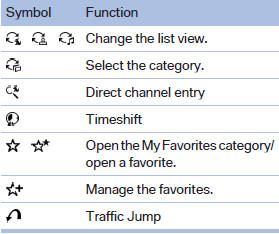
With navigation system: the functions of the navigation bar symbols can also be stored on the programmable memory buttons.
They are stored.
See also:
Welcome lamps
When parking the vehicle, leave the switch in
position or
: the parking and interior
lamps light up briefly when the vehicle is unlocked.
Activating/deactivating
1. "Settings"
2. &q ...
Lumbar support
The curvature of the seat backrest can be adjusted
in such a way that it supports the lumbar
region of the spine. The lower back and the
spine are supported for upright posture.
► Press the ...
Compressed audio files
Playback
1. Select the directory if necessary.
Select the directory if necessary
2. Press the button.
3. Select a track.
Select a track
4. Press the button.
5. Select "Play".
6 ...