
Selecting a station
1. "Radio".
2. "FM" or "AM".
3. Select the desired station.
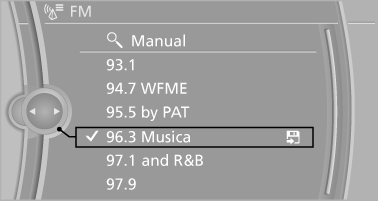
All saved stations are stored for the remote control currently in use.
See also:
For Canadian customers
Canadian customers who wish to report a safety-related defect to Transport Canada,
Defect Investigations and Recalls, may telephone the toll-free hotline 1-800-333-0510.
You can also obtain other ...
Power failure
After a temporary power loss, some equipment
needs to be reinitialized.
Individual settings need to be reprogrammed:
▷ Seat, mirror, and steering wheel memory:
store the positions again.
...
First aid kit
The first aid kit is located in the container on the
inside of the trunk lid.
Unscrew the wing nut to open.
Some of the articles have a limited service life.
Check the expiration dates of the c ...