
Equalizer
Setting for individual audio frequency ranges.
Adjusting the equalizer
1. "CD/Multimedia", "Radio" or "Settings".
2. "Tone".
3. "Equalizer".
4. Select the desired setting.
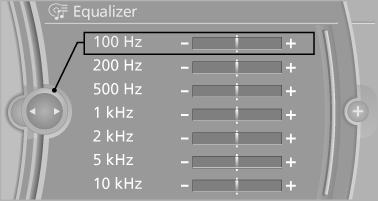
5. To adjust: turn the controller.
6. To store: press the controller.
See also:
External devices
General information
External audio and video devices and digital
cameras can be connected to cinch sockets, on the CD/DVD player. Operation
takes place on the external device.
Due to the large n ...
The right place for children
Note
Children in the vehicle
Do not leave children unattended in the
vehicle; otherwise, they could endanger themselves
and other persons, e.g., by opening the
doors.◄
Children should alw ...
Fuel cap
Opening
1. Briefly press the rear edge of the fuel filler
flap.
2. Turn the fuel cap counterclockwise.
3. Place the fuel cap in the bracket attached to
the fuel filler flap.
Closing
1. ...