
SPORT
Sporty driving with optimized chassis and suspension with maximum driving stabilization.
The program can be configured to individual specifications. The configuration is stored for the remote control currently in use.
Activating SPORT
Press button repeatedly until SPORT is displayed in the instrument cluster.
Configuring SPORT
When the display is activated on the Control Display, the sport program can be set to individual specifications.
▷ Activate the sport program.
▷ "Configure SPORT mode".
▷ Configure the program.
Optionally, the sport program can be configured
before it is activated:
1. "Settings"
2. "SPORT mode"
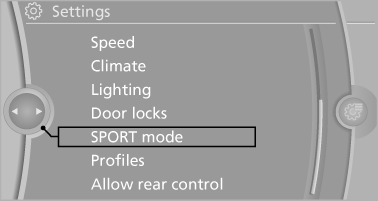
3. Configure the program.
This configuration is retrieved when the sport program is activated.
See also:
Checking the pressure
Only check the tire inflation pressure when the
tires are cold. This means after driving no more
than 1.25 miles/2 km or when the vehicle has
been parked for at least 2 hours. When the tires
a ...
Overview, instrument cluster with enhanced features
Overview, instrument cluster with enhanced features
1 Fuel gauge
2 Speedometer
3 Indicator/warning lamps
4 Tachometer
5 Engine oil temperature
6 Current fuel consumption
7 Electronic displa ...
Switching on/off
Press the button ...