
Operating the programs
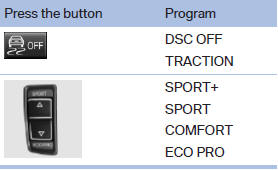
Automatic program change
The system automatically switches to COMFORT in the following situations:
▷ Failure of DSC Dynamic Damping Control.
▷ The vehicle has a flat tire.
▷ When activating cruise control in TRACTION or DSC OFF mode.
See also:
Indication of a flat tire
The yellow warning lamp lights
up. A
Check Control message is displayed.
There is a flat tire or a major loss in tire
inflation pressure.
1. Reduce your speed and stop cautiously.
Avoid sudd ...
Adjusting
The parking lamps or low beams
must be switched on to adjust the
brightness.
Adjust the brightness using the
thumbwheel. ...
Indication of a flat tire
The yellow warning lamp lights up. A
Check Control message is displayed.
There is a flat tire or a major loss in tire
inflation pressure.
1. Reduce your speed and stop cautiously.
Avoid sudde ...