
Calling up information on the info display
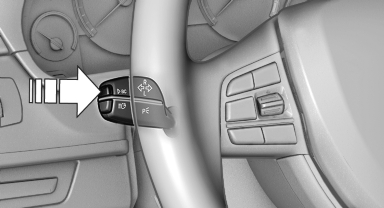
Calling up information on the info display
Press the onboard computer button on the turn signal lever.
Information is displayed on the info display of the instrument cluster.
See also:
Cleaning the windshield and headlamps
Pull the lever, arrow 4.
The system sprays washer fluid on the windshield
and activates the wipers briefly.
When the vehicle lighting system is switched on,
the headlamps are cleaned at regular ...
Sitting safely
The ideal seating position can make a vital contribution
to relaxed, fatigue-free driving.
The seating position plays an important role in
an accident in combination with:
Safety belts.
He ...
Display on the Control Display
Display the computer or trip computer on the
Control Display.
1. "Vehicle Info"
2. "Onboard info" or "Trip computer"
Resetting the fuel consumption or
speed
1. &q ...