
Overview, instrument cluster
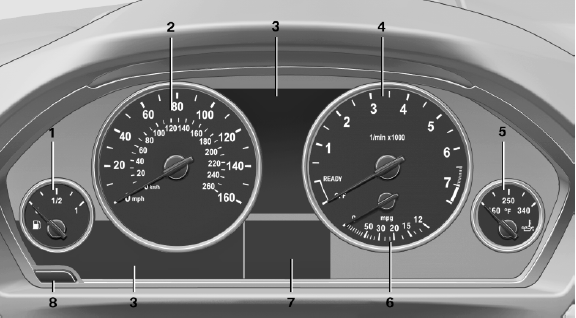
Overview, instrument cluster
1 Fuel gauge
2 Speedometer
3 Indicator/warning lamps
4 Tachometer
5 Engine oil temperature
6 Current fuel consumption
7 Electronic displays
8 Display/reset miles
See also:
Operating from the outside
▷ Via the remote control.
▷ Via the driver's door lock.
▷ Via the door handles.
▷ Via the button in the trunk lid.
The following takes place simultaneously when
locking/u ...
Vehicle equipment
All standard, country-specific and optional
equipment that is offered in the model series is
described in this chapter. Therefore, equipment
is also described that is not available in a vehicle, ...
What to do if…
For information on suitable mobile phones.
> Appointments, tasks, notes, texts, or emailsfrom the mobile phone are
not displayed?
The mobile phone is not suitable for the missing function or is ...