
Adjusting the height
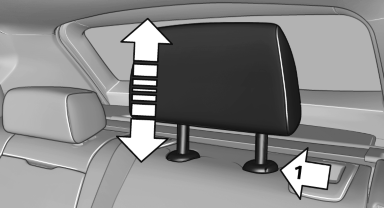
Adjusting the height
▷ To raise: pull.
▷ To lower: press the button, arrow 1, and push the head restraint down.
The center head restraint cannot be adjusted in elevation.
See also:
Planning a trip with intermediatedestinations
New trip
1. "Navigation"
2. "Map"
3. Move the controller to the left if necessary.
4. "Guidance"
5. "Enter new destination"
6. Select the type of destina ...
Capacities
...
Malfunction
The cooler cannot be switched on or switches
off, e.g., when the cooling system overheats or
if the battery voltage is low. One of the LEDs
flashes.
Remedy the problem
1. If necessary, allow t ...