
Adjusting the height
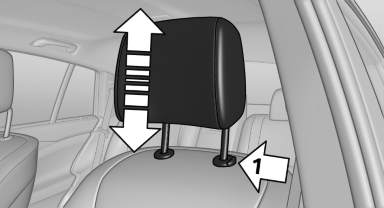
Adjusting the height
▷ To raise: pull.
▷ To lower: press the button, arrow 1, and push the head restraint down.
See also:
Avoiding unintentional alarms
The tilt alarm sensor and interior motion sensor
can be switched off together, such as in the following
situations:
▷ In duplex garages.
▷ During transport on car-carrying trains, at ...
Switching on/off
Press the button. ...
Calendar
Display the calendar
Appointments during the last 20 and the next 50
days can be displayed.
1. "Office"
2. "Calendar"
The appointments on the current day are
displayed.
Se ...