
Weights
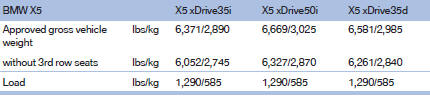
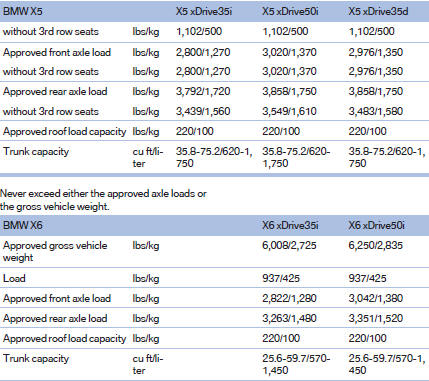
Never exceed either the approved axle loads or the gross vehicle weight.
See also:
Switching on/off
1. "Settings"
2. "Head-up display"
3. "Head-up display"
Switch the Head-up Display ON/OFF as required. ...
Service and Warranty Information Booklet for US models and
Warranty and Service Guide Booklet for Canadian models
Please consult your Service and Warranty Information
Booklet for US models and Warranty and
Service Guide Booklet for Canadian models for
additional information on service requirements.
Mainten ...
Country codes of DVDs
Your DVD player only plays DVDs with the coding
of your home region, e.g., Europe=2. The
country codes supported by your DVD are contained
in the information on your DVD.
An overview of the cod ...