
Starting BMW Online
1. "BMW Assist" or "ConnectedDrive"
2. "BMW Online"
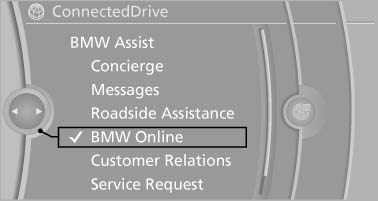
Starting BMW Online
3. If necessary, "OK".
The BMW Online home page is displayed.
See also:
Settings for external devices
1. Press the
button during playback.
Settings for external devices
2. Make the settings with the remote control:
▷ "Video settings":
▷ "Brightness", "Colo ...
Address book
Selecting a destination from the
address book
1. "Navigation"
2. "Address book"
Contacts with addresses are displayed if
these have been checked as destinations.
If the mob ...
Cameras
The objectives of the Top View cameras are located
at the bottom of the exterior mirror housings.
The image quality may be impaired by dirt.
Clean the lens. ...