
Displaying messages
1. "Office"
2. "Messages"
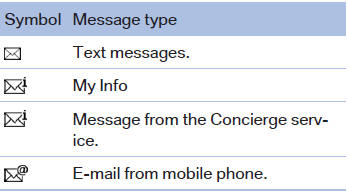
A symbol identifies the type of message.
See also:
Display the appointment
1. Select the desired appointment.
2. Scroll through the appointment if necessary:
▷ Turn the controller.
▷ Select the symbol.
Using contact data
Contact data from appointments, tasks ...
Long-term vehicle storage
Your service center can advise you on what to
consider when storing the vehicle for longer
than three months. ...
2007 BMW X3 Review
BMW's compact SUV, the X3, has sparked a parade of competitors from Acura to
Volvo, all seemingly aimed at convincing shoppers too rich for a Honda CR-V
that, yes, there is a $40,000 alternative. ...