
Changing batteries
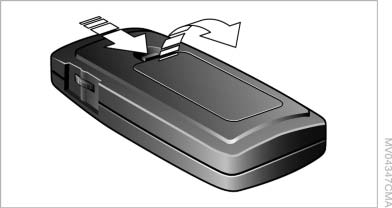
Changing batteries
1. Press the detent and remove the cover.
2. Change the batteries. The type and installation position are marked on the bottom of the battery compartment.
3. Close the cover.
 Take the used battery to a
recycling center
or to your service center.
Take the used battery to a
recycling center
or to your service center.
See also:
Playback
1. Switch on the external device and start the
playback.
2. Open the start menu with the remote control.
3. Select "AUX".
4. Press the
button.
Playback
For devices without a vide ...
System limits
Check the traffic situation as well
PDC cannot serve as a substitute for the
driver's personal judgment of the traffic situation.
Check the traffic situation around the vehicle vehicle
with yo ...
Left and right roadside parking lamps
The vehicle can be illuminated on one side.
Switching on
After parking the vehicle, press the lever up or
down beyond the resistance point for approx.
2 seconds, arrow 3.
The roadside parking la ...