
Controls
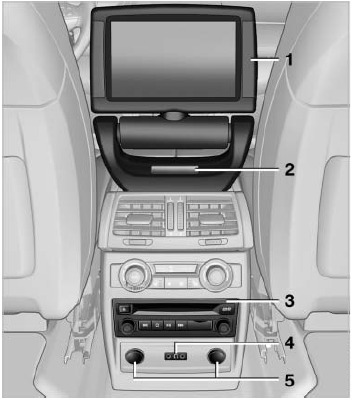
Controls
1 Display screen
2 Infrared interface for headphones
3 CD/DVD player
4 Headphone connection: jack plug
5 12 V sockets
See also:
Storage compartments inside the vehicle
Compartments are located next to the steering column, on the doors and
in the center console.
Coupe: clothes hooksThere are clothes hooks in the rear.
Items of clothing hung from the hooks must n ...
Enabling operation in the rear
Only possible via the iDrive in the front.
1. "Settings"
2. "Allow rear control"
3. Select the desired priority.
...
The concept
The concept
Two radar sensors below the rear bumper monitor
the area behind and next to the vehicle at
speeds above approx. 30 mph/50 km/h.
The system indicates whether there are vehicles
...