
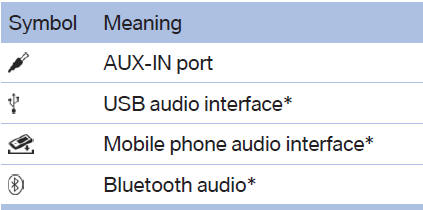
External devices
At a glance
See also:
Saving a function
1. Highlight the function via the iDrive.
2. Press
the desired button for more
than 2 seconds. ...
Current fuel consumption
Instrument cluster
Displays the current fuel consumption.
You can check
whether you are currently driving
in an efficient and environmentally-
friendly manner.
Instrument cluster with enhan ...
Driving
I'd feel a bit bad for the driver on that trip, though. While the
400-horsepower, turbocharged 4.4-liter V-8 engine is relatively sprightly in the
750i, I thought it was a bit of a laggard while t ...