
Adjusting the height
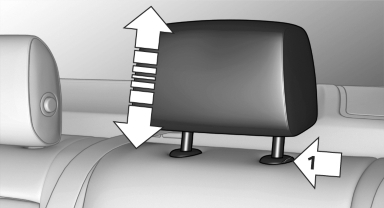
▷ To raise: pull.
▷ To lower: press the button, arrow 1, and
push the head restraint down.
See also:
Display on the Control Display
The traffic area to the left and right is displayed
on the Control Display.
Guidelines at the bottom of the image show the
position of the front of the vehicle.
Brightness
With the Side View ...
Turn signal, high beams,
headlamp flasher
Turn signal
Using turn signals
Press the lever beyond the resistance point.
To switch off manually, press the lever to the resistance
point.
Unusually rapid flashing of the indicator lamp indi ...
Sitting safely
The ideal seating position can make a vital contribution
to relaxed, fatigue-free driving.
The seating position plays an important role in
an accident in combination with:
▷ Safety belts.
...