
Controls
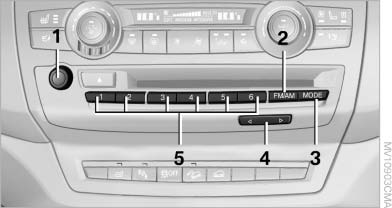
Controls
1 Volume, on/off
2 Change wave band
3 Change entertainment sources
4 Change station/track
5 Programmable memory buttons
See also:
Fresh Design. Well-Balanced Proportions.
The body design of the 2011 BMW X5 is characterized by well-balanced
proportions that accentuate the vehicle's powerful presence and agility. A long
wheelbase, short front and rear body overhangs, ...
Programs
The system offers two different programs.
The programs can be selected via Dynamic Driving
Control.
SPORT
Consistently sporty control of the shock absorbers
for greater driving agility.
SPORT+ ...
Controls
1 Screen, left
2 Screen, right
3 Center armrest, remote control
4 CD/DVD player ...