
Removing ski bag
The ski bag can be completely removed, e.g., for faster drying or to allow it to be put to other uses.
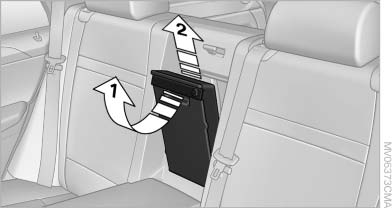
Removing ski bag
1. Pull the handle forward, arrow 1.
2. Take out the ski bag upward, arrow 2.
3. Close the cover in the cargo area.
More information on the various inserts available can be obtained from the service center.
See also:
Tachometer
Always avoid engine speeds in the red warning
field. In this range, the fuel supply is interrupted
to protect the engine. ...
Resuming the original route
If the route section should no longer be bypassed:
1. "Navigation"
2. "Route information"
3. "New route for:"
4. "Remove blocking" ...
Bluetooth audio
Overview> It is possible to use Bluetooth to play music files from external devices,
e.g. audio devices or mobile phones.
Using a mobile phone as an audio source.
> Bluetooth® is a registere ...