
Selecting chassis and suspension tuning
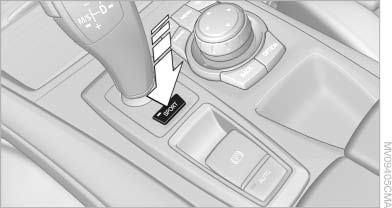
Selecting chassis and suspension tuning
Press the button.
The system switches between the two chassis and suspension tuning settings.
▷ Sport:
The LED in the button lights up and SPORT
is displayed in the instrument panel.
▷ Normal:
The LED in the button goes out.
The selection of the chassis and suspension tuning setting is stored for the remote control currently in use.
See also:
Intermittent operation or rain sensor
The concept
The rain sensor automatically controls the time
between wipes depending on the intensity of
the rainfall. The sensor is located on the windshield,
directly behind the interior rearview ...
Interior
Where BMW has always done things right is on the inside. Sliding into the
driver's seat — my test car had the optional contour seat package, a $1,200
option — is akin to being let into a room at t ...
Safety belts
Seats with safety belt
The vehicle has five seats, each of which is
equipped with a safety belt.
Number of safety belts
Your vehicle has been fitted with five safety belts
for the safety of you a ...