
Increasing or reducing speed
The speed can be changed in the range from approx. 4 mph/6 km/h to approx. 15 mph/25 km/ h by pressing the accelerator or brake pedal lightly.
A target speed within the same range can be specified using the lever of the cruise control.
On inclines over 10 %, you can reduce the speed to approx. 3 mph/4 km/h. Pull the lever of the cruise control beyond the resistance point, arrow 3.
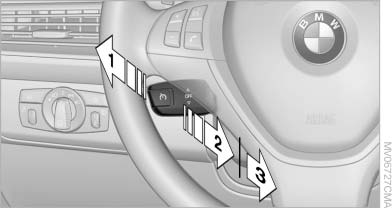
Increasing or reducing speed
1 Increasing speed
2 Pull to the resistance point: reduce the speed to approx. 4 mph/6 km/h
3 Pull beyond the resistance point: on inclines over 10 %, reduce the speed to approx.
3 mph/4 km/h
See also:
Notes on Emergency Requests
Do not use the voice activation system to initiate
an Emergency Request. In stressful situations,
the voice and vocal pitch can change. This can
unnecessarily delay the establishment of a teleph ...
For US owners only
The transmitter and receiver units comply with
part 15 of the FCC/Federal Communication
Commission regulations. Operation is governed
by the following:
FCC ID:
▷ NBG009014A.
Compliance ...
Using contact data
At a glance
Contact data from appointments, tasks, text
messages, emails and notes can be stored or
selected.
Displaying contact or selecting phone
number
1. "Use contact data"
2. Di ...