
Switching the interior lamps on and off
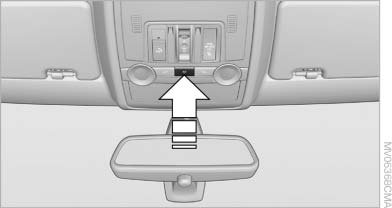
Switching the interior lamps on and off
Press the button.
To switch off permanently: press the button for approx. 3 seconds.
To clear this setting: briefly press the button.
See also:
Check Control
The conceptThe Check Control monitors vehicle functions and alerts you to any malfunctions
in the systems monitored. Such a Check Control message includes indicator and warning
lamps in the instru ...
TeleService
General information
TeleService supports communication with your
service center.
▷ Data on the vehicle's service requirements
can be sent directly to the service center. In
this way, the ...
Drivetrains
The 528i, 535i and 550i are rated at 240, 300 and 400 horsepower,
respectively. The turbocharged version of the 3.0-liter inline-six-cylinder in
the 535i makes the 550i superfluous, rocketing the ...