
Units of measure
Setting the units of measure
To set the units for fuel consumption, route/distance, temperature, and pressure:
1. "Settings"
2. "Language/Units"
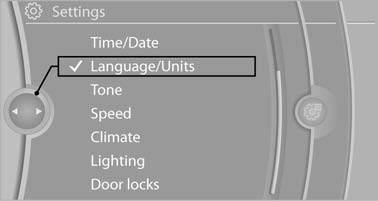
Language/Units
3. Select the desired menu item.
4. Select the desired unit.
The setting is stored for the remote control currently in use.
See also:
Drive-off assistant
This system supports driving away on gradients.
The parking brake is not required.
1. Hold the vehicle in place with the foot brake.
2. Release the foot brake and drive away without
delay.
Depen ...
BMW Maintenance System
The maintenance system directs you to required
maintenance measures and thereby supports
you in maintaining road safety and the operational
reliability of the vehicle. ...
Power failure
After a temporary power loss, some equipment
needs to be reinitialized.
Individual settings need to be reprogrammed:
▷ Seat, mirror, and steering wheel memory:
store the positions again.
...