
Storing
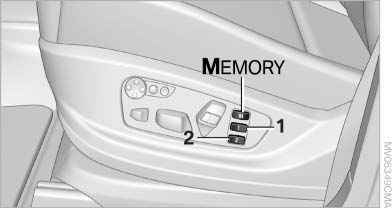
Storing
1. Switch on the radio ready state or the ignition
2. Set the desired seat, exterior mirror and steering wheel positions.
3.  Press the button. The LED in
the
button lights up.
Press the button. The LED in
the
button lights up.
4. Press the desired memory button 1 or 2. The LED goes out.
If the M button is pressed accidentally:
 Press the button again. The LED
goes
out.
Press the button again. The LED
goes
out.
See also:
Ride & Handling
One of my lasting memories of the prior-generation X3 was its extremely firm
ride, which led to a choppy driving experience on rough roads. It was
disappointing, to say the least, because BMWs oft ...
Navigation
General information
Map
Split screen settings
Destination guidance with intermediate destinations
...
Entering a town/city
1. Select "Town/City/Postal Code" or the displayed
town/city.
Town/City/Postal Code
2. Select letters, if necessary.
The list is narrowed down further with each
entry.
3. Move the ...