
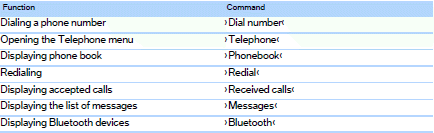
Telephone
See also:
Fuel cap
Opening
1. Briefly press the rear edge of the fuel filler
flap.
2. Turn the fuel cap counterclockwise.
3. Place the fuel cap in the bracket attached to
the fuel filler flap.
Closing
1. Fi ...
Design: Exterior
The design of the new BMW X3 conveys elegance, agility and ruggedness. Up
front, the forward-slanting BMW kidney grille and large headlight assembly
combine with a powerful-looking front apron and ...
Telephone
...