
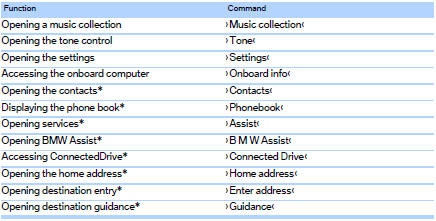
Useful short commands
See also:
The design: commanding presence and athletic elegance.
The new BMW 6-Series Coupe heralds the arrival of an exceptionally sporty and
exclusive 2+2-seater in the premium segment of top-class Coupes. The new model's
extra length and width over its prede ...
Activating HDC
Activating HDC
Press the button; the LED above the button
lights up.
The LED flashes when the brakes are applied
automatically. ...
Following the initial pairing
► The mobile phone is detected/connected in
the vehicle within a short period of time
when the engine is running or the ignition is
switched on.
► The phone book entries of the telepho ...