
Diagnosis OBD
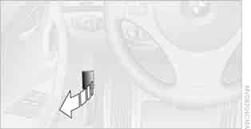
On the driver's side is an OBD socket for checking components relevant to the composition of the vehicle's emissions.
See also:
Switching on/off manually
Press the button.
On: the LED lights up.
Off: the LED goes out.
The PDC is shown on the Control Display.
Switch on the backup camera via the iDrive. ...
System limits
Sudden tire damage
Sudden serious tire damage caused by
external influences cannot be indicated in advance.◀
A natural, even pressure loss in all four tires cannot
be detected. Therefore, ...
Example: playing back a CD
1. Switch on the Entertainment sound output
if necessary.
2. Press the button on the
steering
wheel.
3. ›C D and multimedia‹
The medium last played is played back.
4. Press the button on t ...