
Route criteria
General information
> You can influence the calculated route by selecting certain trip criteria.
> Route criteria can be changed during destination entry and during route guidance.
> Street types are part of the navigation data and are taken into account in route
planning, e.g. avoiding highways.
> The proposed route can differ from personal experience.
> The settings are stored for the remote control currently in use.
> Route guidance with traffic bulletins.
1. "Navigation"
2. "Map"

3.  "Route preference"
4. Selecting a criterion:
> "Fast route": time-optimized route through
a combination of the least possible distance and stretches of road that allow rapid
driving.
>  "Efficient route": optimized combination of the
fastest and shortest possible route.
"Efficient route": optimized combination of the
fastest and shortest possible route.
>  "Short route": short distance without taking time
into account.
"Short route": short distance without taking time
into account.
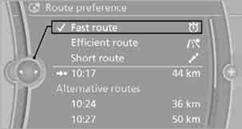
> "Alternative routes": are suggested, where possible, during active route guidance. The individual suggestions are labeled in color.
5. Select additional route criteria, if desired.
Where possible, the selected criteria will be avoided on the route.
> "Avoid highways": highways are avoided where possible.
> "Avoid toll roads": toll roads are avoided where possible.
> "Avoid ferries": ferries are avoided where possible.
The setting applies to the current route and to the planning of future routes.
See also:
Tire inflation pressures at max. speeds
above 100 mph/160 km/h
Speeds above 100 mph/160 km/h
In order to drive at maximum speeds in excess
of 100 mph/160 km/h, please observe, and,
if necessary, adjust tire pressures for speeds
exceeding 100 mph/160 km/h ...
Automatic deactivation
In certain situations, the Automatic Engine Start/
Stop Function is deactivated automatically for
safety reasons, such as when the driver is detected
to be absent.
Malfunction
The automatic en ...
Ride & Handling
One of my lasting memories of the prior-generation X3 was its extremely firm
ride, which led to a choppy driving experience on rough roads. It was
disappointing, to say the least, because BMWs oft ...