
Convertible: through-loading opening with integrated transport bag
The transport bag is designed for safe, clean transport of up to 4 pairs of standard skis or up to 2 snowboards.
With the transport bag you can stow skis up to a length of 6.6 ft/2.0 m. When skis of 6.6 ft/2.0 m length are loaded, the overall capacity of the ski bag is reduced due to its tapered design.
 When using the transport bag, it is not permissible
to transport passengers in the rear seats.
When using the transport bag, it is not permissible
to transport passengers in the rear seats.
1. Pull the grip in the filler piece of the rear backrest up and take out
the filler piece.
2. Place the filler piece onto the seat cushion with the backrest side facing
up.
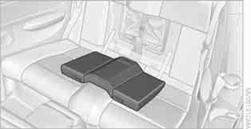
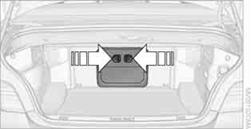
3. In the cargo area: press the two recesses together and fold down the cover.
4. Release the strap, lay out the transport bag between the front seats and load it.
The zip fastener makes objects in the ski bag easier to reach.
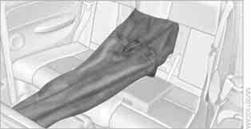
Ensure that the skis are clean when you load them into the transport bag. Wrap sharp edges to prevent damage.
Securing cargo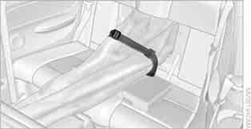
After loading, secure the transport bag and its contents. Tighten the retaining strap on the tensioning buckle for this purpose.
Secure the transport bag in the manner described;
otherwise, it could endanger the car's occupants, e.g. in case of heavy braking
or sudden swerving.
To store the transport bag, perform the steps described for loading in reverse order.
See also:
Reporting safety defects
For US customers
The following only applies to vehicles owned
and operated in the US.
If you believe that your vehicle has a defect
which could cause a crash or could cause injury
or death, yo ...
Manual air distribution
The air distribution can be adjusted to individual
needs.
Press the button repeatedly to
select a
program:
Upper body region.
Upper body region and footwell.
Footwell.
...
Vehicle equipment
All standard, country-specific and optional
equipment that is offered in the model series is
described in this chapter. Therefore, equipment
is also described that is not available in a vehicle,
e ...