
High beams/roadside parking lamps
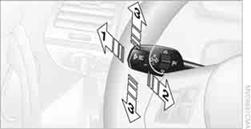
1 High beams
2 Headlamp flasher
3 Roadside parking lamps
Roadside parking lamps, left or rightThere is an additional option of switching on the lamps on the side of the car facing the road when parked.
Switching on
After parking the vehicle, press the lever up or down beyond the pressure point for approx.
1 second, arrow 3.
 The roadside parking lamps drain the battery.
Therefore, do not leave them on for unduly long periods of time; otherwise, the
battery might not have enough power to start the engine.
The roadside parking lamps drain the battery.
Therefore, do not leave them on for unduly long periods of time; otherwise, the
battery might not have enough power to start the engine.
Switching off
Press the lever in the opposite direction to the pressure point, arrow 3.
See also:
Notes
Manufacturer's information for child restraint
fixing systems
To select, mount and use child restraint fixing
systems, observe the information provided by
the system manufacturer; otherwise, ...
External devices
At a glance
...
Following part replacement
The same breaking in procedures should be observed
if any of the components mentioned
above have to be renewed in the course of the
vehicle's operating life. ...