
Navigation
General information
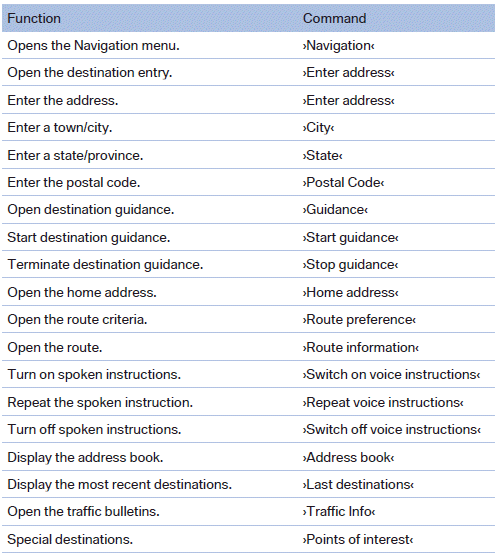
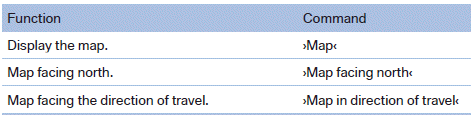
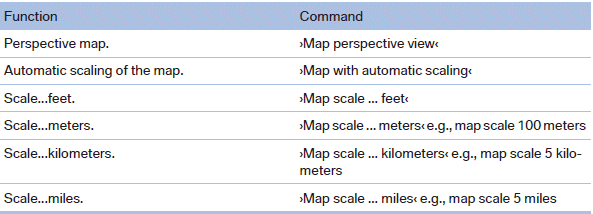
Map
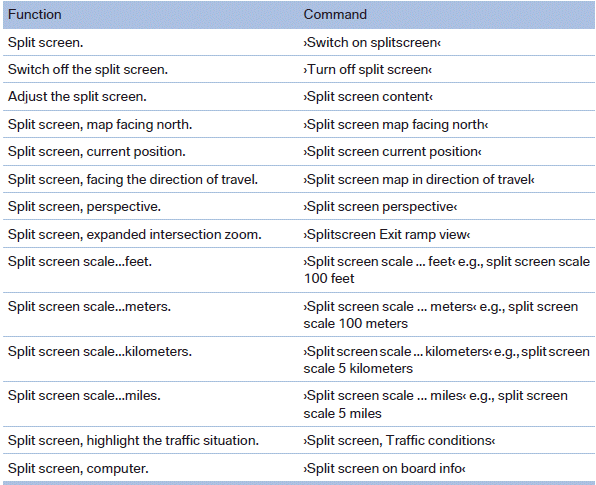
Split screen settings

Destination guidance with intermediate destinations
See also:
Vehicle equipment
All standard, country-specific and optional
equipment that is offered in the model series is
described in this chapter. Therefore, equipment
is also described that is not available in a vehicle,
e ...
Recommended tire brands
Recommended tire brands
For each tire size, the manufacturer of your vehicle
recommends certain tire brands. These
can be identified by a star on the tire sidewall.With proper use, these tires ...
DTMF suffix dialing
DTMF suffix dialing can be used for gaining access
to network services or for controlling devices,
e.g., to make a remote inquiry of an answering
machine. The DTMF code is needed for this
purp ...