
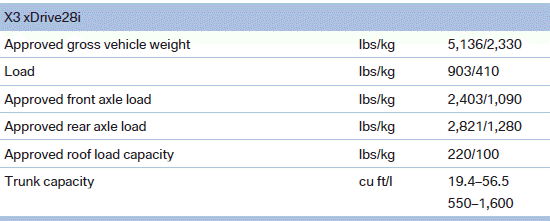
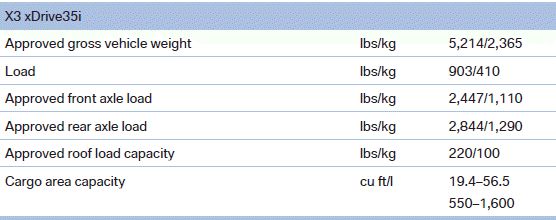
Weights
See also:
Malfunctions
Steering wheel vibration
Frequent activation of the steering wheel vibration
causes the system to overheat.
This causes the lane departure warning to become
deactivated.
Let the system cool and ...
M Sport package
The M Sport package brings the ultimate in sporting makeovers to the new BMW
3-Series. An all-new aerodynamic package for the exterior clearly sets cars
specified with this package apart from the ...
Calling up the desired speed and
distance
While driving
Press the button with the system
switched on.
In the following cases, the stored speed value is
deleted and cannot be called up again:
▷ When the system is switched off.
& ...