
Entering a phone number
Dialing a number
1. "Telephone"
2. "Dial number"
3. Select the digits individually.
4.  Select the symbol.
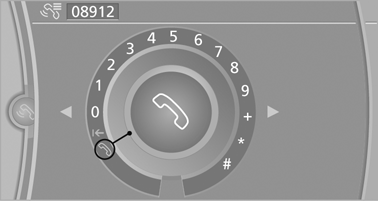
The phone number can also be entered by voice.
See also:
Modern Line
In contrast to Luxury Line models, the high-class trim elements included in
Modern Line versions of the new BMW 3-Series Sedan are all in satinated
aluminium, underlining the contemporary characte ...
Warning triangle
The warning triangle is located in the cargo area. ...
General information
Your vehicle contains advanced technology for
the reduction of fuel consumption and emissions.
Fuel consumption depends on a number of different
factors.
The implementation of certain measures ...