
Controls
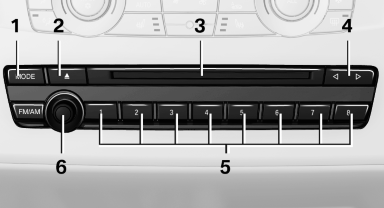
1 Change the entertainment source
2 Eject CD/DVD
3 CD/DVD drive
4 Change station/track
5 Programmable memory buttons
6 Volume, on/off
See also:
Important features in the engine compartment
1 Vehicle identification number*
2 Jump starting, negative terminal
3 Washer fluid reservoir
4 Jump starting, positive terminal
5 Oil filler neck. 760i/Li: filler neck is located
under a flap. ...
Socket for OBD OnboardDiagnosis
Position
There is an OBD socket on the driver's side for
checking the primary components in the vehicle
emissions.
Emissions
► The warning lamp lights up:
Emissions are deteriorati ...
Equalizer
Setting for individual audio frequency ranges.
Adjusting the equalizer
1. "CD/Multimedia", "Radio" or "Settings"
2. "Tone"
3. "Equalizer"
4. Sele ...