
Switching the high beams on and offmanually
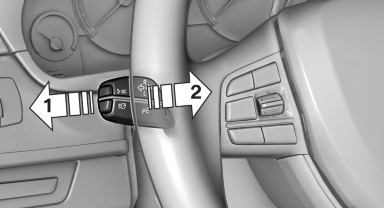
► High beams on, arrow 1.
► High beams off/headlamp flasher, arrow 2.
The High-beam Assistant can be switched off when manually adjusting the light. To reactivate the High-beam Assistant, press the button on the turn signal lever.
See also:
BMW X6 M
The X6 M steps up from the 400-hp, 4.4-liter V-8 to a twin-turbocharged
version making 555 hp. Torque is rated at 500 pounds-feet. BMW says the zero to
60 mph time is 4.5 seconds. A six-speed auto ...
Switching off automatically
The system switches off and the LED goes out:
▷ After approx. 33 ft/10 m when driving forward.
▷ After approx. 9 mph/15 km/h when driving
forward.
Switch on the system again if necess ...
Transmitting the settings
Your personal settings can be taken with you to
another vehicle equipped with the Personal Profile
function. For more information, contact your
service center.
Transmission takes place via:
&# ...