
Activating
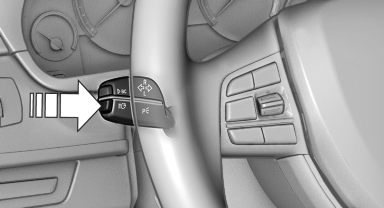
1. Turn the light switch to  or
or
 .
.
2. Press the button on the turn signal lever, arrow.
 The indicator lamp in the
instrument
cluster lights up.
The indicator lamp in the
instrument
cluster lights up.
When the lights are switched on, the high beams are switched on and off automatically.
The system responds to light from oncoming traffic and traffic driving ahead of you, and to adequate illumination, e.g., in towns and cities.
See also:
Owner's Manual for Vehicle
Thank you for choosing a BMW.
The more familiar you are with your vehicle, the better control you
will have on the road. We therefore strongly suggest:
Read this Owner's Manual before starting off ...
Image on the Control Display
Switching on the rear view camera using iDrive
With PDC activated:
"Rear view camera"
The image of the rear view camera is displayed.
The setting is stored for the remote control curren ...
Deleting the last destinations
1. "Navigation"
2. "Last destinations"
3. Highlight the destination.
4. Open "Options".
5. "Delete entry" or "Delete all last
destinations" ...