
Welcome lamps
When parking the vehicle, leave the switch in
position  or
or
 : the parking and interior
lamps light up briefly when the vehicle is unlocked.
: the parking and interior
lamps light up briefly when the vehicle is unlocked.
Activating/deactivating
1. "Settings"
2. "Lighting"
3. "Welcome light"
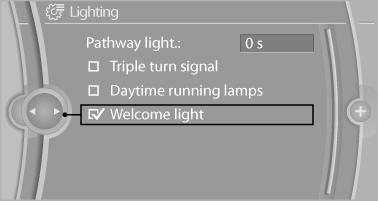
The setting is stored for the remote control currently in use.
See also:
Notes
Shatter-proof containers and no
hot
drinks
Use light and shatter-proof containers and do
not transport hot drinks. Otherwise, there is the
increased danger of injury in an accident.
Unsuit ...
For 520i and 528i: Check oil
level
The concept
The oil level is monitored electronically during
driving and shown on the Control Display.
If the oil level reaches the minimum level, a
check control message is displayed.
Displayi ...
California Proposition 65 warning
California law requires us to issue the following warning:
Engine exhaust and a wide variety of automobile
components and parts, including components found in the interior furnishings in
a vehic ...