
Display
The following is displayed in the instrument cluster.
Speed limit detection
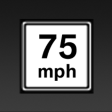 ► Current speed limit.
► No speed limit - for the German
autobahn.
► Speed limit detection is not
available.
Speed limit detection can also be displayed in the Head-up Display.
No Passing Information
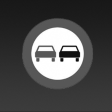 ► Start of No Passing zone.
► End of No Passing zone.
► No Passing Information not
available.
No Passing Information can also be displayed in the Head-up Display.
See also:
Adjusting the ventilation temperature
This function can be used to adjust the air temperature
for the upper body region.
1. "Settings"
2. "Climate"
3. "Driver ventilation" or "Front passenger
vent ...
Multi-channel playback,
surround
Setting multi-channel playback,
surround
1. "CD/Multimedia", "Radio" or "Settings"
2. "Tone"
3. "Surround"
Surround
When surround is activate ...
Exterior
The new 6 Series measures some 3 inches longer and 1.5 inches wider than its
predecessor; it's a few tenths of an inch shorter at the roof level. As before,
the car maintains a short front overhan ...