
Engine oil temperature
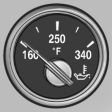 ► Cold engine: the pointer is
at
the low temperature end.
► Cold engine: the pointer is
at
the low temperature end.
Drive at moderate engine and vehicle speeds.
► Normal operating temperature:
the pointer is in the middle or in the left half of the temperature display.
► Hot engine: the pointer is at the high temperature end. A Check Control message is displayed in addition.
See also:
Front lamps, bulb replacement
At a glance
Halogen headlamps
1 High beams/headlamp flasher
2 Parking lamps
3 Low beams
4 Turn signal/side marker light
Xenon headlamps
1 Parking lamps / daytime running lights
2 Low beams ...
Using the remote control
General information
Take the remote control with you
People or animals left unattended in a
parked vehicle can lock the doors from the inside.
Always take the remote control with you
when leav ...
Malfunction
The small warning
lamp flashes in yellow
and then lights up continuously;
the larger warning lamp comes on in
yellow. On the Control Display, the
tires are shown in gray and a message appear ...