
Electronic displays
With the Professional navigation system
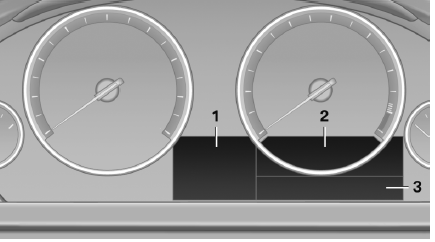
1 Selection list, such as for the radio
Navigation display
Speed limit detection
Computer
2 Transmission displays
3 Service requirements
Messages, e.g. Check Control
With the Business navigation system or no navigation
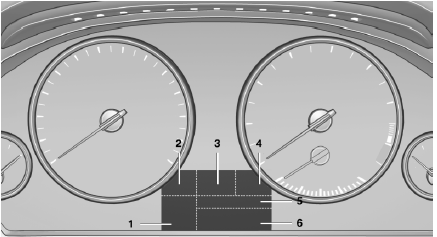
1 Clock
External temperature
2 Messages, e.g. Check Control
3 Transmission displays
4 Selection lists, e. g. Dynamic Driving Control
5 Computer
6 Service requirements
See also:
Connecting jumper cables
1. Fold open the cover of the BMW starting-aid
terminal. To do so, pull the tab.
2. Attach one terminal clamp of the positive
jumper cable to the positive terminal of the
battery, or to the cor ...
Selecting chassis and suspension tuning
Selecting chassis and suspension tuning
Press the button.
The system switches between the two chassis
and suspension tuning settings.
▷ Sport:
The LED in the button lights up and SPORT
...
Enabling operation in the rear
Only possible via the iDrive in the front.
1. "Settings"
2. "Allow rear control"
3. Select the desired priority.
...