
Integrated key
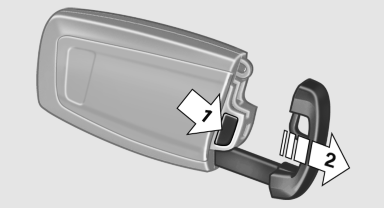
Press the button on the back of the remote control, arrow 1, and pull out the key, arrow 2.
The integrated key fits the following locks:
► Driver's door.
► Glove compartment on the front passenger
side.
See also:
Sound output
Switching on/off
When the ignition is switched off: press ON/OFF
button on the radio.
Muting
When the ignition is switched on or the engine
is running: press the ON/OFF button on the
radio. ...
Buttons on the remote control
1 Unlocking
2 Locking
3 Opening the tailgate
4 Panic mode, headlamp courtesy delay feature ...
Switching the reception on/off
1. "Navigation"
2. Open "Options".
3. "Receive Traffic Info" ...