
Rear CD/DVD player
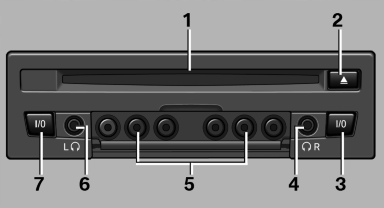
1 CD/DVD slot
2 Eject CD/DVD
3 On/off, right
4 Headphone connection, right
5 RCA sockets
6 Headphone connection, left
7 On/off, left
See also:
Integrated Owner's Manual inthe vehicle
The integrated Owner's Manual can be displayed
on the Control Display. The equipment
and functions that are in the vehicle are described
therein. ...
Tires
Due to technical factors associated with their
manufacture, tires do not achieve their full traction
potential until after an initial breaking-in period.
Drive conservatively for the first 200 mi ...
Service Request
At a glance
Sends information to your service partner to request
the arrangement of a service appointment.
The TeleService data is transmitted during
a Service Request. If possible, your servic ...