
At a glance
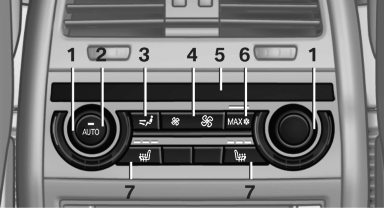
1. Temperature
2. AUTO program
3. Vent settings
4. Air volume, AUTO intensity
5. Display
6. Maximum cooling
7. Seat heating
See also:
Notes
One person per safety belt
Never allow more than one person to wear
a single safety belt. Never allow infants or small
children to ride on a passenger's lap.◀
Putting on the belt
Lay ...
Automatic deactivation of the front passenger airbags
The occupation of the seat is detected by evaluating
the impression on the occupied seat surface
of the front passenger seat.
The front and side airbags on the front passenger
side are activate ...
Note
Manufacturer's information for LATCH
child restraint fixing systems
To mount and use the LATCH child restraint fixing
systems, observe the operating and safety
information from the system man ...