
Automatic climate control
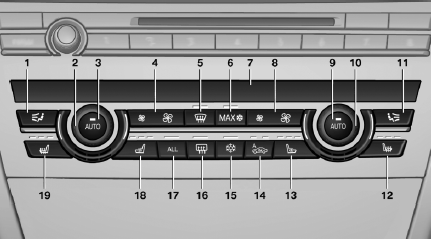
1. Air distribution, left
2. Temperature, left
3. AUTO program, left
4. Air volume, AUTO intensity, residual heat,
left
5. Remove ice and condensation
6. Maximum cooling
7. Display
8. Air volume, AUTO intensity, right
9. AUTO program, right
10. Temperature, right
11. Air distribution, right
12. Seat heating, right
13. Active seat ventilation, right
14. Automatic recirculated-air control/recirculated-
air mode
15. Cooling function
16. Rear window defroster
17. ALL program
18. Active seat ventilation, left
19. Seat heating, left
See also:
Audio playback
Selecting the track using the button
Press the button for the appropriate direction
as often as necessary until the
desired track is played back.
Selecting the track using the iDrive
Audio C ...
Ignition off
Press the Start/Stop button again, and do not
press on the brake pedal at the same time.
All indicator lamps in the instrument cluster go
out.
To save battery power when the engine is off,
swi ...
Drive away without delay
Do not wait for the engine to warm up while the
vehicle remains stationary. Start driving right
away, but at moderate engine speeds.
This is the fastest way for the cold engine to
reach its ope ...