
Display in the instrument cluster
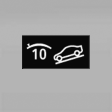 The selected speed is displayed
in the speedometer.
The selected speed is displayed
in the speedometer.
▷ Green: the system is actively braking the vehicle.
▷ Orange: the system is on standby.
See also:
Rear entertainment
Vehicle equipment
All standard, country-specific and optional
equipment that is offered in the model series is
described in this chapter. Therefore, equipment
is also described that is not avai ...
Overview, Instrument cluster with enhanced features
1 Fuel gauge
2 Speedometer
3 Indicator/warning lamps
4 Tachometer
5 Engine oil temperature
6 Electronic displays
7 Display/reset miles ...
Reading out loud
Text messages, e-mails, appointment entries,
tasks, and notes can be read out loud.
1. Select the desired message, appointment,
task, or note.
2. Select the symbol.
The following options are a ...