
Display
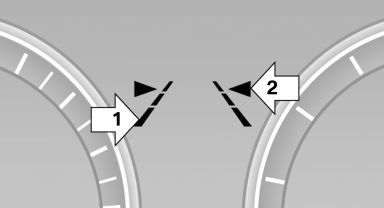
▷ Lines, arrow 1: the system is activated.
▷ Arrows, arrow 2: at least one lane marking
was detected and warnings can be issued.
See also:
Use coasting conditions
When approaching a red light, take your foot off
the accelerator and let the vehicle coast to a halt.
On a downhill gradient, take your foot off the accelerator
and let the vehicle roll.
The flo ...
Language
Setting the language
To set the language on the Control Display:
1. "Settings"
2. "Language/Units"
3. "Language:"
4. Select the desired language.
The setting is s ...
Parked car ventilation
The conceptThe parked car ventilation provides ventilation to the passenger compartment
and lowers its temperature, if necessary.
The parked car ventilation system is operated via iDrive. Two diffe ...