
Switching the high beams on and off manually
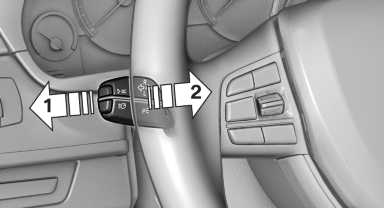
Switching the high beams on and off
manually
▷ High beams on, arrow 1.
▷ High beams off/headlamp flasher, arrow 2.
To reactivate the High-beam Assistant, press the button on the turn signal lever.
See also:
Driver's door controls
Roller blind for rear window
Press the button.
Extending or retracting the roller blinds
together
Press and hold the button. ...
Selecting the destination
1. "Navigation"
2. "Map"
The current position of the vehicle is displayed
on the map.
3. "Interactive
map"
Interactive map
4. Select the destination with cros ...
Features
Like most up-level BMWs these days, the 650i can be equipped with a dizzying
array of technological wizardry. Ours came equipped with an optional lane
departure warning and correction system, adap ...