
Overview, instrument cluster
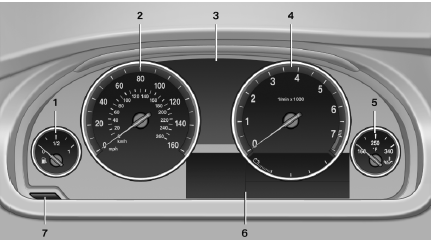
1 Fuel gauge
2 Speedometer
3 Indicator/warning lamps
4 Tachometer
5 Engine oil temperature
6 Electronic displays
7 Display/reset miles
See also:
What to do if…
For information on suitable mobile phones.
> Appointments, tasks, notes, texts, or emailsfrom the mobile phone are
not displayed?
The mobile phone is not suitable for the missing function or is ...
Status indicator on the Control DisplayThe status is displayed.
The tire and system status is indicated by the
color of the tires.
A change in the tire inflation pressure during
driving is taken into account.
A correction is only necessary if this is indicat ...
After refilling diesel exhaust fluid
Incorrect fluid
Incorrect fluids
After refilling with the incorrect fluid, e.g.,
antifreeze for windshield wiper fluid, do not start
the engine because this could result in a fire
hazard. ...