
Activating/deactivating the system manually
Using the button
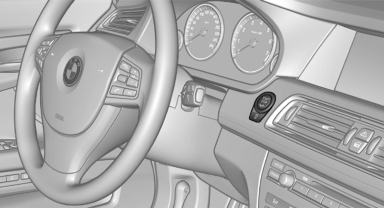
 Press the button.
▷ LED comes on: Auto Start Stop function is
deactivated.
The engine is started during an automatic
engine stop.
The engine can only be stopped or started
via the Start/Stop button.
▷ LED goes out: Auto Start Stop function is
activated.
Switching off the vehicle during an automatic engine stop
During an automatic engine stop, the vehicle can be switched off permanently, e.g., when leaving it.
1. Press the Start/Stop button. The ignition is switched off. The Automatic Engine Start/ Stop Function is deactivated.
Automatic transmission: the transmission position P is engaged automatically.
2. Set the parking brake.
Engine start as usual via Start-/Stop button.
See also:
Volume
▷ "Speed volume": speed-dependent volume
control.
▷ "PDC": volume of the PDC signal compared
to the entertainment sound output.
▷ "Gong": volume o ...
General information
General information
The vehicle is supplied with two remote controls
with keys.
Each remote control contains a rechargeable
battery that is automatically recharged when it
is in the ignition ...
What to do if...
Information on suitable mobile phones
Appointments, tasks, notes, text messages, or
e-mails from the mobile phone are not displayed.
▷ The mobile phone is not capable of the
missing functi ...