
Distance to back of head: manual head restraints
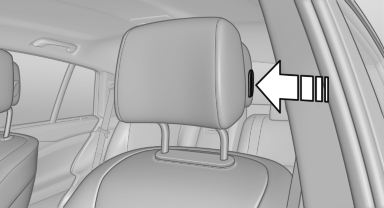
Distance to back of head: manual head
restraints
▷ Forward: by pulling
▷ Back: press the button and push the head
restraint toward the rear.
See also:
Before mounting
If the rear seat backrests are adjustable:
Before mounting child restraint fixing systems,
return all of the rear seat backrests to the basic
position. ...
Displaying images from CD/DVD
1. Push the CD/DVD into the drive with the labeled
side facing upward. The CD/DVD is
automatically pulled in.
2. Open the start menu with the remote control.
3. Select "Photo".
4. Pr ...
Fog lamps
Front fog lamps
The parking lamps or low beams must be
switched on.
Press the button. The green
indicator
lamp lights up.
If the automatic headlamp control, is activated, the low beams will ...